The Cable locator tab contains the following controls:
|
Basic |
Advanced |
Professional |
Availability of the "Cable locator" tab in different editions |
|
|
|
 = new feature

The Cable locator tab
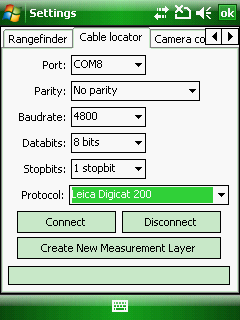
Serial port settings
The Serial Port Parameters are used to specify communication settings for your auxiliary serial port. For most serial devices, it is usually not necessary to specify the Parity, Databits and Stopbits additional serial communication settings.
Port: Choose the COM port that your Cable locator is connected to on your device. The default is COM8.
Parity: Choose the parity of your Cable locator. The default is No parity.
Baud: Choose the baud rate (data transfer speed) of your Cable locator’s output. The default is 4800.
Databits: Choose the number of data bits of your Cable locator. The default is 8 bits.
Stopbits: Choose the number of stop bits of your Cable locator. The default is 1 stopbit.
Protocols settings
Protocol: Choose one from the following protocols
●Leica Digicat 200 - or newer Digicat cable locators
●RD8000 - Radio Detection RD8000
 Video tutorials: SebaKMT vLocPro2; Radio Detection RD8000
Buttons
Connect - Connects to the Cable locator
Disconnect - Disconnects the Cable locator
Create New Measurement Layer - Creates a point feature layer with the following attributes:

●ID ●Count ●Date ●PosX ●PosY |
●ID ●Device ●SerialNumber ●SoftwareID ●Date ●Calibration ●SelfTest ●Battery ●Mode ●Signal ●Unit ●Depth |
●ID ●Date ●PosX ●PosY ●Command ●Frequency ●Depth (mm) ●Current (mA) ●Locate Current Direction |
●ID ●Date ●PosX ●PosY ●Mode ●Frequency (HZ) ●Depth (m) ●Fault find signal (dB microvolts) ●Locate current (A) ●Phase (degrees) ●Signal strength ●Gain |
Cable locator debug: shows NMEA sentences when the Cable locator is active.